| Mobile Web App or PWA | Available  |
| Google Play Store | Unavailable  |
| Android .apk | Unavailable |
| iOS App | Unavailable |
RoyalistPlay publishes no app and no install guide for either system. Its help pages explain where to click by naming a top right corner and a left hand menu, and a phone screen has neither of them.
The casino answer, when it arrives, is an appendix to the sports one.
| Mobile Web App or PWA | Available |
| Google Play Store | Unavailable |
| Android .apk | Unavailable |
| iOS App | Unavailable |
RoyalistPlay publishes no app and no install guide for either system. Its help pages explain where to click by naming a top right corner and a left hand menu, and a phone screen has neither of them.
The casino answer, when it arrives, is an appendix to the sports one.
Yes, and there is nothing here to decline. No .apk is published, the brand appears in neither store, and no page explains installing an application.
Seven entries fill the top navigation: casino, live casino, sports, live betting, esports, virtual sports and promotions. Six columns fill the footer beneath them. None of the links in either place concerns an app.
That leaves the browser, which carries all six products behind one login. If you want the site within reach, the icon has to be placed by hand, because the option is never mentioned.
iPhone — Safari
Android — Chrome
An icon placed that way is free and holds no files, so no storage goes with it and the latest version is whatever the server sends that day.
Help answers here are specific about where to click, and every location they name belongs to a wide screen.
Your username sits in the top right corner. The password reset link is at the top of your screen. The filter you need is on the left hand side menu.
A phone has none of the three. On a mobile screen the account menu collapses behind an icon, the side menu becomes a drawer, and nothing occupies a top right corner because there is no corner to spare.
So the reader most likely to need these steps is the one least able to follow them. Checking a bet from a handset means translating every instruction before using it.
One question is headed with the casino: where to view casino activity, and how to tell a winning bet from a losing one.
Its answer opens on the sportsbook instead. A full paragraph covers the bet list, the custom timeframe, the show button and the plus-minus column, green for a win and red with a minus sign for a loss.
The casino instruction arrives after all that, and it begins by telling you to follow the steps above. Live casino gets one further sentence pointing at the same menu.
Nothing in the answer is wrong. It is written as an appendix to a sportsbook, which says plainly which half of this site the help pages were built around.
Payment methods get an answer of their own. It names bank wire, credit cards, e-wallets and prepaid cards, then sends you to the payment methods page for the detail.
That page is not in the footer. The six columns carry promotions, results, about, contact, betting information, betting rules, an FAQ, a disclaimer and six legal policies, and payments is not among them.
Ten payment logos do sit at the foot of the page: Skrill, Visa, Mastercard, Neteller, ecoPayz, Rapid, Interac, JCB, Discover and PayRedeem. Logos, with no limits, no fees and no processing times attached to any of them.
So the detail exists, on the FAQ’s word, somewhere the footer does not reach. Ask support for that link before depositing rather than after.
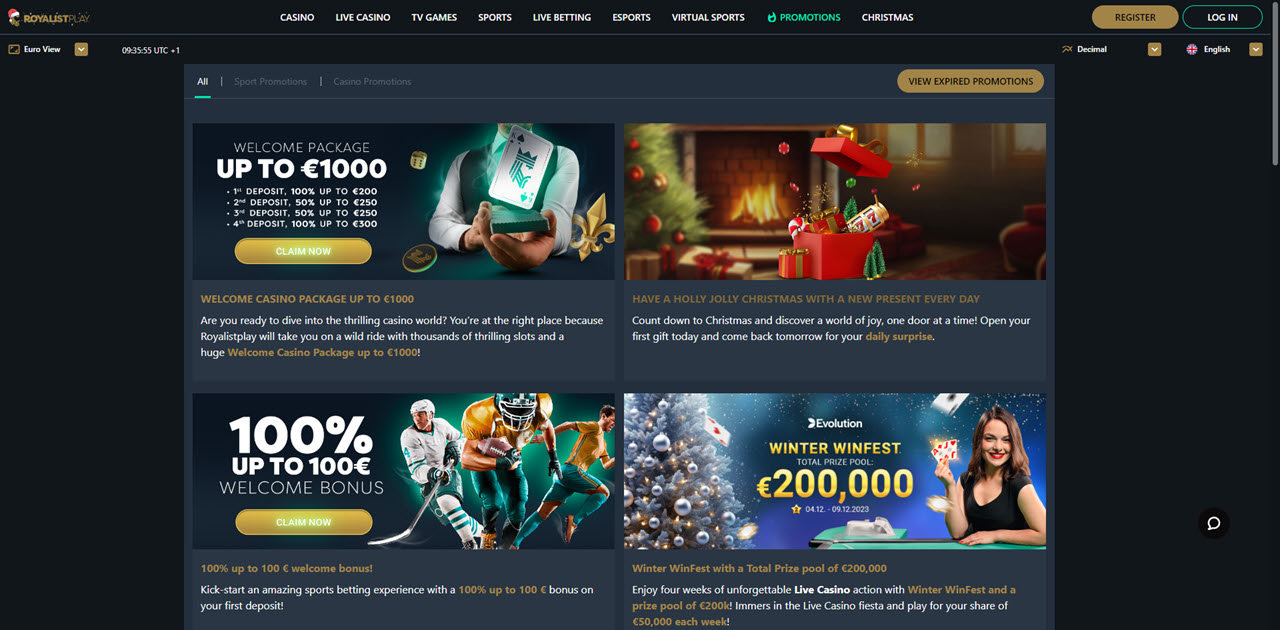
Six cards sit under the casino filter on the promotions page. Two of them are the house’s own: a welcome package and a reload offer.
The other four carry a game studio’s name and its artwork. Two come from a single supplier and the remaining pair from two more, and each runs as a network campaign across many casinos at once.
That changes who can fix a problem. A dispute about the reload offer goes to the operator, which wrote it. A dispute about a network tournament goes to a company you hold no account with, through a casino that did not set its rules.
Check the studio name in the corner of each card before opting in, because only two of the six are promises this operator made itself.
RoyalistPlay demands nothing of a handset, because there is nothing to install and no file to refuse. One browser and one login cover the casino, the live floor, the sportsbook, live betting, esports and virtual sports.
Its help pages are the weaker half. They describe a screen layout a phone does not have, they answer the casino question by pointing back at the sports one, and they send you to a payments page the footer never links.
No operator and no licence appear on the pages checked. The only company named anywhere sits under the words Powered by at the very bottom, and a platform supplier is not a licensee.
✅ Players who want six products behind one login and no download
✅ Desktop users, for whom the help pages were plainly written
✅ Anyone content to place a home-screen icon without being told how
✗ Phone users who expect help text that matches their screen
✗ Casino players wanting answers written for the casino
✗ Depositors who check an operator and a licence number first
No. No file is published for Android, neither store lists the brand, and the site offers no install page at all. A home-screen icon added through the browser is free, takes no storage and opens the same site.
The promotions page carries each offer’s own terms behind a More Info button, and it keeps an archive of expired promotions as well. Payment detail is a different matter: the FAQ names a payment methods page that the footer does not link.